

Play
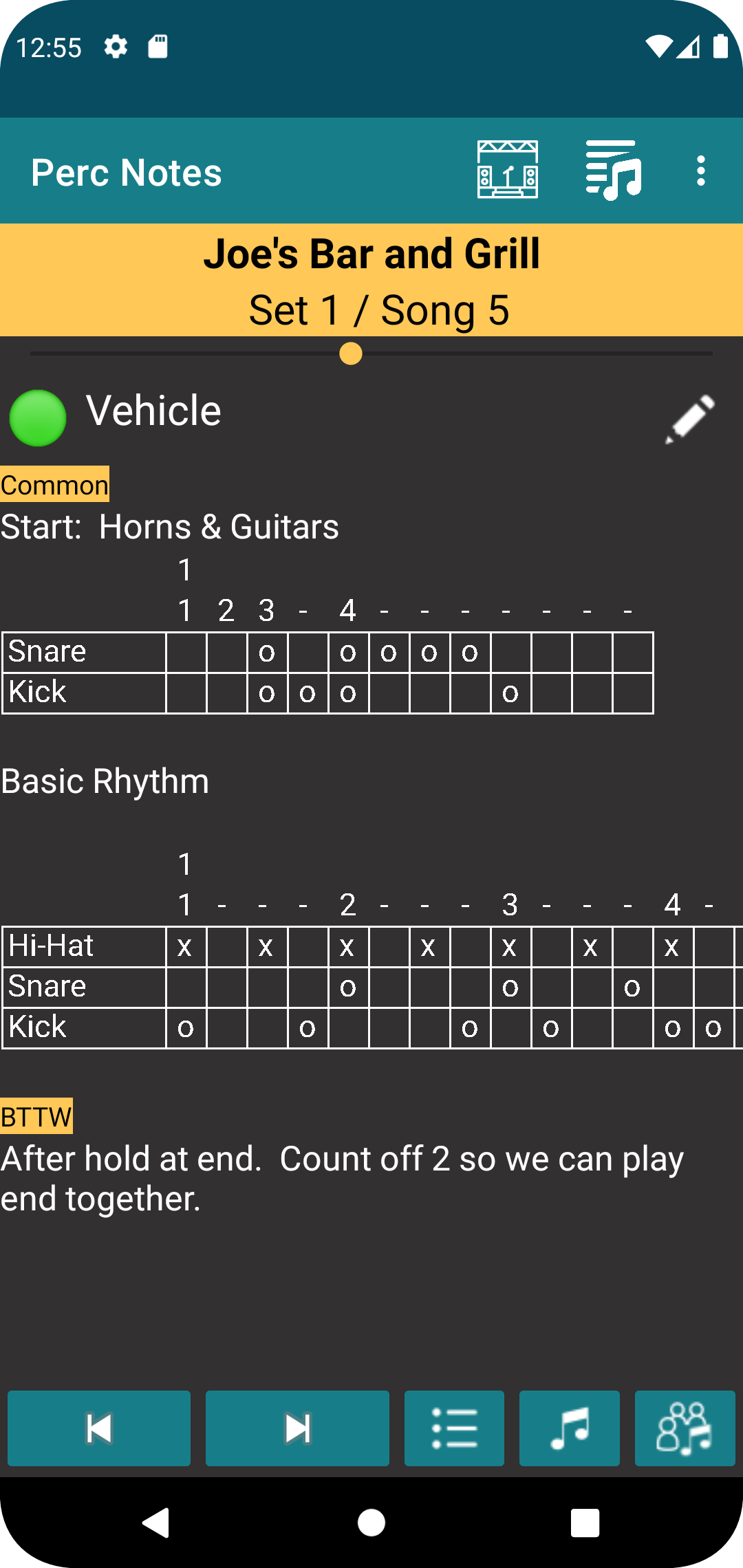
This is the main display of the application that provides the information you need during a gig. The heading for the display shows the title of the gig as well as the set number and song number that is currently active. The metronome shows the tempo for song, which can be a common one for all bands or unique to a specific band. The notes section will shows notes that are common for all bands and band-specific notes.
Buttons
Select any any gig that you have configured.

Open the display that allows you to add or edit songs, gigs, and bands.

Move to the next or previous song in the gig. This is normally what you use to move between songs while on stage.

Select a set in the gig, which will move to first song in the selected set. While on stage, it allows you to move to a different set quickly if the band decides to change the set order.

Jump to any song for the active gig and make that the current song. This is useful if the band decides to play a song out of order. The next and previous buttons will then operate just as if you had proceeded to the song in the normal fashion.

Select a song from the band's repertoire, which includes songs outside of the currently active gig. If a song is selected that is part of the gig, the app will simply jump to that song as it does for the button described above. If a song is selected that is not part of the gig, the next and previous buttons will be replaced with the clear button.

Clear the current song and return to the last active song in the gig.